MacBook Neo vs. MacBook Air: The Ultimate Buying Guide for 2025
Torn between the MacBook Neo and MacBook Air? We break down every key difference to help you make the smartest purchase decision.

MacBook Neo vs. MacBook Air: Which One Is Right for You?
Choosing between the MacBook Neo and the MacBook Air doesn't have to be a headache. Whether you're worried about overspending or concerned about buying a machine that won't meet your needs, this guide will walk you through everything you need to know — from performance and design to multimedia capabilities and value for money.
The Quickest Way to Make Your Decision
Here's a simple question that can settle the debate instantly: Will this be your primary work laptop, used eight or more hours a day?
If the answer is yes, skip the MacBook Neo entirely. Its price tag may be tempting, but the compromises it demands from a full-time professional user are simply too significant to overlook.
If the answer is no — maybe you already have a work machine at the office and just need something reliable for evenings, weekends, or travel — then the MacBook Neo becomes a genuinely smart, budget-friendly choice. It also makes an excellent laptop for high school or college students who don't need top-tier performance every single day.
That's a simplified framework, but it's a solid starting point.
Design, Size, and Aesthetics
Screen Size and Portability
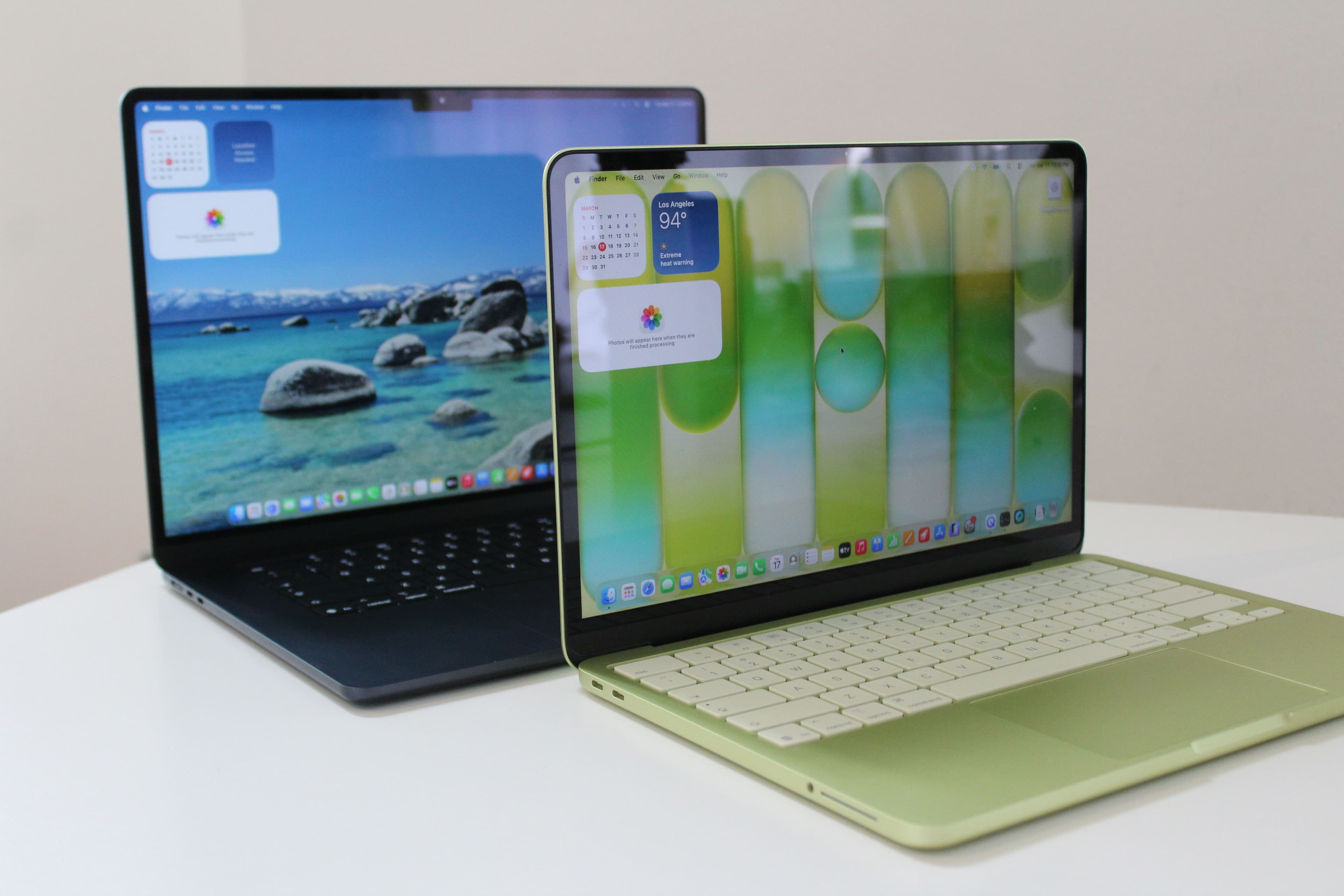
The physical differences between these two laptops are less dramatic than most people expect. The MacBook Neo sports a 13-inch display, while the MacBook Air offers a slightly larger 13.6-inch screen. Switching between the two is comfortable enough that most users won't find the difference jarring. If you crave more screen real estate, Apple also offers a 15-inch MacBook Air — though that upgrade adds $200 to the price.
In terms of thickness, the MacBook Air measures just 0.44 inches, compared to the Neo's 0.50 inches. Both laptops weigh the same, making portability a near-equal draw.
Style and Color Options
The MacBook Neo takes a slightly bolder approach to aesthetics. It features rounder edges, white keycaps, and a broader palette of color options including Silver, Blush, Citrus, and Indigo. Citrus and Indigo deliver a more eye-catching look, while Silver and Blush lean toward understated elegance. The Neo's colors aren't as vibrant as those on the iMac lineup, but they do offer more personality than a standard MacBook.
One standout design choice on the Neo is the absence of a notch in the display. While thin bezels are universally desirable, the notch has always been a polarizing design element — and the Neo's cleaner screen border is a welcome departure.
Keyboard and Trackpad
Both laptops share a nearly identical keyboard layout and typing feel. However, only the upgraded MacBook Neo model (starting at $699) includes Touch ID built into the power button — a notable omission on the base version that will have users typing their passwords far more often than they'd like.
The MacBook Air holds a clear edge when it comes to the trackpad. Its larger surface uses a haptic feedback mechanism rather than a physical click, resulting in quieter, more consistent responsiveness across the entire pad — even at the edges. The Neo's trackpad is still decent, but its audible mechanical click feels comparatively dated.
Performance: Where the Gap Really Shows
Processing Power and Memory
Instead of Apple's M-series chips, the MacBook Neo is powered by the A18 Pro — the same chip found in recent iPhones. In practice, it performs somewhere between the M1 and M2, which is adequate for casual use but not groundbreaking.
The more pressing concern is memory. The MacBook Neo is locked at 8 GB of RAM with no upgrade path available. That's a significant limitation, especially since macOS alone consumes approximately 6 GB at idle due to background AI processes. Under heavier workloads — multiple browser tabs, streaming video, and several open apps running simultaneously — the system can begin to feel the strain.
The MacBook Air, by contrast, starts with 16 GB of RAM and runs Apple's latest M5 chip. While this level of power exceeds what most everyday users will ever fully utilize, that headroom is precisely what makes the Air so future-proof and versatile. It can handle creative applications, light video editing, gaming, and virtually anything else a non-professional user might throw at it — all while remaining whisper-quiet and impressively thin.
For those who require even greater muscle, the M5 Pro and M5 Max MacBook Pros cater to professionals working in AI-enhanced video production or complex rendering workflows. But for the vast majority of users, the MacBook Air's M5 is more than sufficient.
Storage and Connectivity
The MacBook Air's internal SSD is dramatically faster than the Neo's — a difference that becomes noticeable during large file transfers and application launches.
On the connectivity front, the MacBook Air includes MagSafe 3 charging plus two Thunderbolt 4 USB-C ports. The MacBook Neo is limited to two USB-C ports, and one of them operates on the outdated USB 2.0 standard — a frustrating bottleneck for anyone transferring large files.
External display support is another area where the Air pulls ahead. The M5 MacBook Air can drive up to two 5K monitors (or two 4K monitors at up to 144 Hz), while the Neo caps out at a single 4K external display. If you're planning a multi-monitor workstation setup, the MacBook Air is the clear choice.
Battery Life
The MacBook Air also delivers a few additional hours of battery life compared to the Neo, depending on the tasks being performed — another advantage for users who need reliable all-day power.
Multimedia: Displays, Speakers, and Webcam
Display Quality
The MacBook Neo's display is one of its strongest selling points. Its high pixel density delivers sharp, vibrant visuals that punch above the laptop's price point. Technically, the MacBook Air offers marginally better color accuracy, but the difference is subtle enough that most users won't notice it in everyday use.
Audio
The MacBook Air features a four-speaker system — two tweeters and two woofers — that produces rich, full-bodied sound for a laptop its size. The MacBook Neo steps down to a standard stereo speaker setup, which sounds noticeably more ordinary by comparison.
Webcam
Both laptops offer 1080p webcams, but the MacBook Neo lacks the Air's 12-megapixel sensor. The result is reduced image detail and weaker low-light performance — a real consideration for anyone who relies on video calls for remote work or virtual meetings.
Our Verdict: Which MacBook Should You Buy?
For most people, the MacBook Air with M5 is the smarter long-term investment. The 13-inch model starts at $1,099 — $100 more than its predecessor — but now comes with double the storage right out of the box. It's a powerhouse machine that most users won't need to replace for years.
That said, the MacBook Neo earns its place in Apple's lineup as an affordable entry point. For parents seeking a capable laptop for a student, or for anyone who needs a reliable secondary device for personal use, the Neo delivers solid everyday performance without breaking the bank — as long as you go in with realistic expectations.
Know what you need, know what you're getting, and you'll make the right call either way.