Build Your Own NAS Server: The Ultimate Guide to Local Backups and Home Streaming
Tired of expensive cloud subscriptions and privacy concerns? Setting up a personal NAS server gives you full control over your files, backups, and media streaming.

Why Build Your Own NAS Server?
In a world dominated by cloud storage and streaming platforms, building your own Network Attached Storage (NAS) server might seem like an old-fashioned idea. But for anyone who values privacy, wants to cut recurring costs, or simply needs a reliable central hub for family files and media, a personal NAS setup makes a compelling case.
Think of a NAS server as your own private cloud — one that lives in your home, operates under your rules, and never sends your data to a server on the other side of the planet. You decide who can access it, how it's organized, and whether it ever touches the internet at all.
Practical Reasons to Consider a NAS Server
Personal File Backup
For anyone managing a large volume of important files — whether that's professional work, family photos, or creative projects — relying solely on USB flash drives or a single cloud service is a risky strategy. A NAS server allows you to run automated local backups continuously, without manual effort.
The golden rule of data backup is the 3-2-1 approach: three copies, on two different media types, with one stored off-site. A NAS handles the local side of that equation beautifully, and pairing it with a cloud service covers the off-site requirement. It's a significant upgrade over ad-hoc backup habits.
Centralized Family File Sharing
Households with multiple members and a mix of devices often end up with files scattered across various cloud platforms and personal gadgets. A NAS server with a well-organized file structure becomes the central hub for shared photos, videos, travel plans, creative projects, and important household documents. Instead of hunting across five different apps and accounts, everything lives in one place.
Home Media Streaming
The streaming landscape has become increasingly expensive, fragmented, and ad-heavy. If you own a physical media collection — DVDs, Blu-rays, or CDs — a NAS server gives you a compelling reason to finally digitize it all.
Ripping Blu-rays is straightforward using MakeMKV, and you can compress files efficiently with HandBrake. From there, installing a media server application like Jellyfin or Plex transforms your NAS into a polished, Netflix-style streaming platform. Jellyfin automatically fetches artwork and metadata, and once installed on your TVs, phones, and tablets, local streaming works seamlessly across every device in your home.
Other Useful Applications
The versatility of a NAS server goes well beyond backups and streaming. Here are some popular use cases worth exploring:
- Smart home automation — Run a local home assistant for device control without relying on third-party servers
- Security camera storage — Record and monitor local security footage privately
- Game servers — Host a private Minecraft server or other multiplayer environments for your family
- Network-wide ad and tracker blocking — Deploy Pi-hole directly from your NAS
- Local AI assistant — Run AI tools privately without sending data to external services
- Remote file sharing — Securely access your files from anywhere using a VPN
Many of these use cases directly replace paid subscription services, meaning your NAS can pay for itself over time while simultaneously returning control and privacy back to you.
What You Need to Get Started
Choosing a NAS Device
You can either build a custom NAS from spare hardware or purchase a ready-made device. Pre-built options vary widely in size, capability, and complexity.
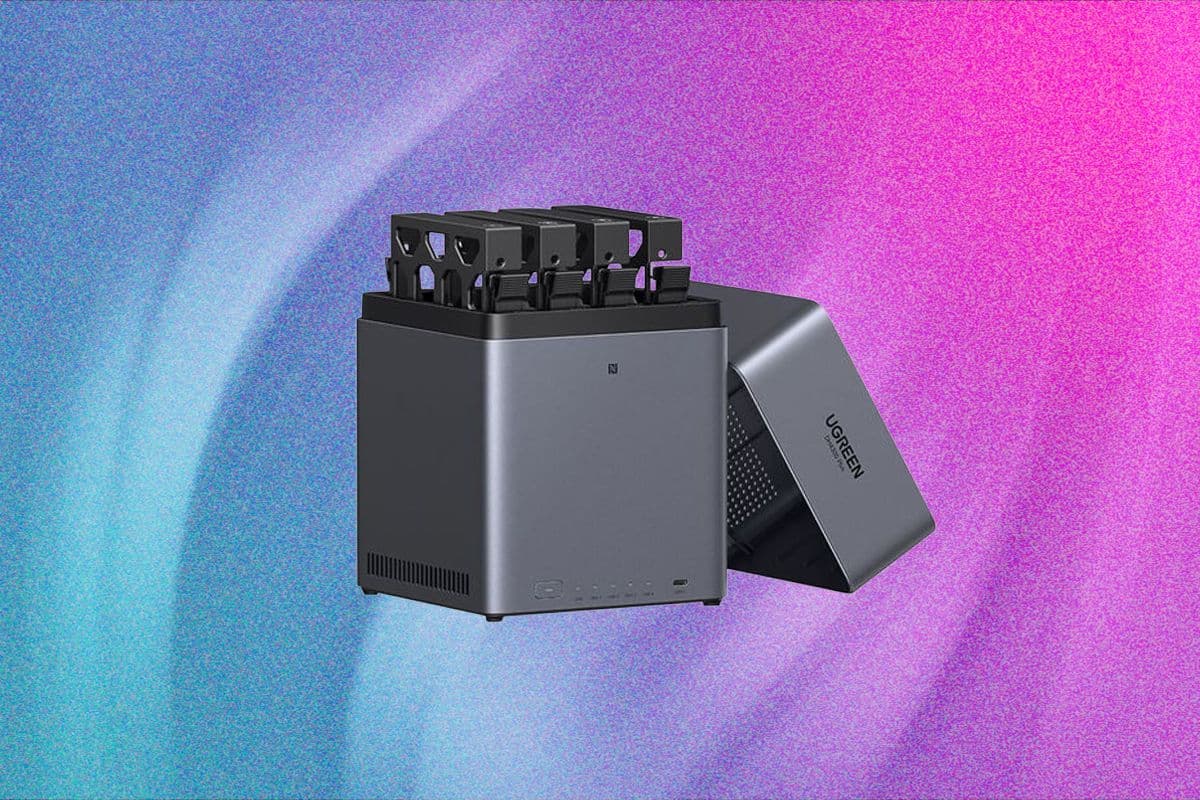
For those prioritizing ease of setup, the Ugreen NASync DH4300 Plus is an excellent starting point. It supports four storage drives and handles up to 120 TB of total capacity. Setup is minimal — insert your drives, connect power and Ethernet to your router, download the companion app, create an account, and format your drives. The entire process takes well under an hour.
A key advantage of the DH4300 Plus is its Docker support, which allows you to install virtually any compatible application in its own isolated container. This dramatically expands what the device can do beyond its built-in features.
If your storage needs are more modest, the Ugreen NASync DH2300 (around $200) offers a two-bay configuration that is equally easy to configure. Other well-regarded NAS brands worth researching include Synology, QNAP, Terramaster, and Asustor, each offering their own ecosystems and feature sets.
Hard Drives and Storage
You can repurpose existing hard drives to save money, or invest in purpose-built NAS drives for better reliability under continuous operation. Drives like the Seagate IronWolf 4TB (approximately $100 each) are specifically designed for NAS environments and handle the demands of 24/7 operation well. For maximum speed and durability, SSDs are an option, though they come at a higher cost per terabyte.
Network Infrastructure
A fast, stable home network is essential if multiple users will be streaming content or transferring large files simultaneously. Your NAS should be connected directly to your main router via an Ethernet cable — not over Wi-Fi. Pay attention to the port speeds on both your router and NAS device, and ensure your Ethernet cables are rated appropriately (Cat 5e at minimum; Cat 6 or higher recommended).
Uninterruptible Power Supply (UPS)
While not strictly mandatory, a UPS is strongly recommended for anyone storing irreplaceable data. A sudden power loss during a write operation can corrupt files or damage drive arrays. A UPS provides enough battery backup to either ride out a brief outage or safely shut down your system.
Two solid options to consider:
- CyberPower 1000VA Battery Back-Up System (~$140) — Six battery-backed outlets, six surge-protected outlets; runs approximately two minutes at full load or up to ten minutes at half load
- Amazon Basics UPS 600VA (~$62) — Four battery-backed outlets, four surge-protected outlets; sufficient runtime to safely power down your system during an unexpected outage
Many modern portable power stations also include UPS functionality, offering a dual-purpose solution.
Keeping Your NAS Secure
Security is a critical consideration, whether your NAS stays entirely local or connects to the outside world.
Avoid Direct Internet Exposure
Never expose your NAS directly to the internet by opening ports on your router. If you need remote access, use a reputable VPN service to encrypt your connection and avoid broadcasting your device to potential attackers.
Secure Your Local Network Too
Even if you never intend to access your NAS remotely, local security still matters. A compromised device on your home network — infected with malware, for example — could potentially spread laterally to your NAS if it isn't properly protected. Enable the built-in firewall on your NAS device and configure it carefully according to the manufacturer's guidelines.
Enable Two-Factor Authentication
Always activate two-factor authentication (2FA) on your NAS account. This adds a critical extra layer of protection by requiring a time-sensitive passcode in addition to your standard login credentials, making unauthorized access significantly harder even if your password is compromised.
Final Thoughts
Setting up a personal NAS server is one of the most practical technology investments a privacy-conscious household can make. It consolidates your backups, centralizes your shared files, replaces multiple streaming subscriptions with a self-hosted alternative, and puts you firmly in control of your own data. The initial setup requires a modest time investment, but the long-term payoff in convenience, cost savings, and peace of mind is well worth it.